Tree
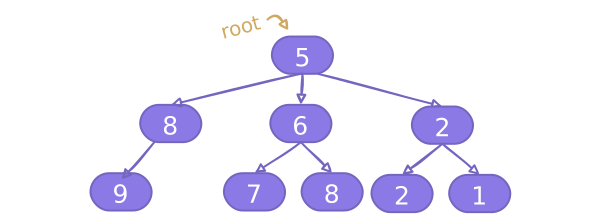
Trees and graphs are similar in that they both consist of nodes and edges. A tree is in fact a more restrictive version of an unweighted directed graph . Trees have some additional properties that make them unique:
- All trees have a single root node with no parent nodes.
- Trees do not contain cycles.
- Every node (besides the root node) has exactly one parent.
The root is at level 0. The deeper the tree, the higher the level:

Examples of questions that we could use trees to solve are:
- What's the height of a given tree?
- Are these two given trees identical?
- Does a certain value exist in a given tree?
Note
Most tree questions will provide you a tree.
We'll still go over how to build one for completeness though.
Binary Tree
The simplest (and most common) type of tree used in coding interviews is the binary tree, which is a tree with at most two children per node.
To create a binary tree, we'll first define a class for its nodes. Each node contains a value, and can have a left child node or right child node:
class Node:
   def __init__(self, value):
       self.value = value
       self.left = None
       self.right = None

# Create our simple mini tree.
root = Node(5)
root.left = Node(8)

Note
We use the __init__ function to initialize the node value during construction.
Using the Node class, let's create the following binary tree:
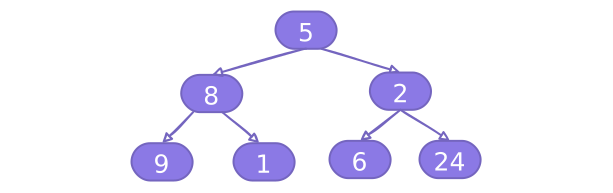
# Define our binary tree's node.
class Node:
  def __init__(self, value):
    self.value = value
    self.left = None
    self.right = None

root = Node(5)
root.left = Node(8)
root.right = Node(2)
root.left.left = Node(9)
root.left.right = Node(1)
root.right.left = Node(6)
root.right.right = Node(24)

print(f"Root node value: {root.value}")
print(f"Left child of root: {root.left.value}")
print(f"Right child of root: {root.right.value}")Check if a value is in a tree
O(n)To find a value in a tree, we use a graph traversal algorithm like depth-first search (DFS) or breadth-first search (BFS). DFS is generally easier to understand and implement, but BFS is necessary if the question revolves around levels.
# Define our binary tree's node.
class Node:
  def __init__(self, value):
    self.value = value
    self.left = None
    self.right = None

root = Node(5)
root.left = Node(8)
root.right = Node(2)
root.left.left = Node(9)
root.left.right = Node(1)
root.right.left = Node(6)
root.right.right = Node(24)

def search_value(node, value) -> bool:
  # Check the current node.
  if node.value == value:
    return True
  # If the left child exists, recurse into it.
  if node.left and search_value(node.left, value):
    return True
  # If the right child exists, recurse into it.
  if node.right and search_value(node.right, value):
    return True
  return False

print("Is 9 in the tree?")
print(search_value(root, 9))
print("Is 6 in the tree?")
print(search_value(root, 6))
print("Is 42 in the tree?")
print(search_value(root, 42))
Binary Search Trees
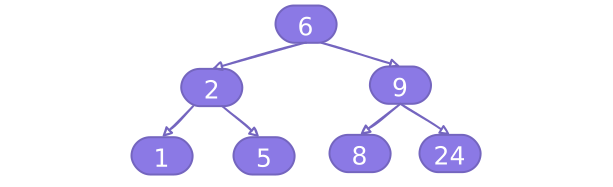
A binary search tree (BST) is a binary tree that satisfies the following properties:
- The left subtree of a node contains only nodes with values less than the current node's value.
- The right subtree of a node contains only nodes with values greater than the current node's value.
- Both the left and right subtrees must also be binary search trees
Though the data structure of a BST is the same as binary tree, for a BST we need to make sure every node added is in the correct place.
# Define our binary search tree's node.
class Node:
  def __init__(self, value):
    self.value = value
    self.left = None
    self.right = None

def add_to(node, value):
  if not node:
    return Node(value)
  if value < node.value:
    node.left = add_to(node.left, value)
  else:
    node.right = add_to(node.right, value)
  return node

root = Node(6)
add_to(root, 2)
add_to(root, 1)
add_to(root, 5)
add_to(root, 9)
add_to(root, 8)
add_to(root, 24)

print(f"Root node value: {root.value}")
print(f"Left child of root: {root.left.value}")
print(f"Right child of root: {root.right.value}")
Check if a value is in the tree
O(log(n))The main advantage of a BST is that it allows for fast lookup, addition, and removal of items. On average, the time complexity for these operations is O(log(n)).
# Define our binary search tree's node.
class Node:
  def __init__(self, value):
    self.value = value
    self.left = None
    self.right = None

def insert(node, value):
  if node is None:
    return Node(value)
  if value < node.value:
    node.left = insert(node.left, value)
  else:
    node.right = insert(node.right, value)
  return node

def search_value(node, value) -> bool:
  if node is None:
    return False
  if node.value == value:
    return True
  if value < node.value:
    return search_value(node.left, value)
  return search_value(node.right, value)

root = Node(6)
insert(root, 2)
insert(root, 1)
insert(root, 5)
insert(root, 9)
insert(root, 8)
insert(root, 24)

print("Is 8 in the tree?")
print(search_value(root, 8))
print("Is 32 in the tree?")
print(search_value(root, 32))
print("Is 11 in the tree?")
print(search_value(root, 11))
Non-Binary Trees
Trees that have more than two children per node are called non-binary trees. These are less common than binary trees, but they are still used in some questions.
To create a non-binary tree, we can use the same Node class as before, but instead of having two children, we use a list to store the children.
class Node:
   def __init__(self, value):
       self.value = value
       self.children = []
Let's see an example of how to create the following binary tree:
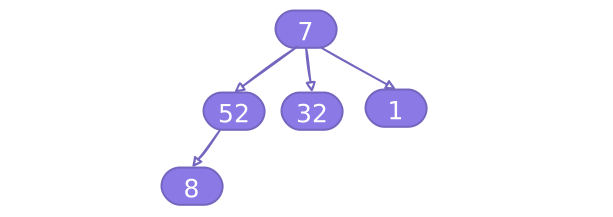
# Define the non-binary tree class
class Node:
  def __init__(self, value):
    self.value = value
    self.children = []

root = Node(7)
root.children.append(Node(52))
root.children[0].children.append(Node(8))
root.children.append(Node(32))
root.children.append(Node(1))

print(f"Root node value: {root.value}")
print(f"First child of root: {root.children[0].value}")
print(f"Second child of root: {root.children[1].value}")
print(f"Third child of root: {root.children[2].value}")
Check if a value is in the tree
O(n)Same as a binary tree, we can find a node in a binary search tree using a traversal algorithm.
# Define the non-binary tree class.
class Node:
  def __init__(self, value):
    self.value = value
    self.children = []

root = Node(7)
root.children.append(Node(52))
root.children[0].children.append(Node(8))
root.children.append(Node(32))
root.children.append(Node(1))

def search_value(node, value) -> bool:
  if node.value == value:
    return True
  for child in node.children:
    if search_value(child, value):
      return True
  return False

print("Is 8 in the tree?")
print(search_value(root, 8))
print("Is 32 in the tree?")
print(search_value(root, 32))
print("Is 11 in the tree?")
print(search_value(root, 11))
Graph Based Trees
A tree is basically a graph with more restrictions - it has no cycles and all nodes are connected. Hence we could build a tree the same way as how we build a graph.
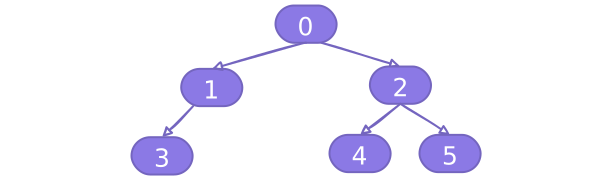
edges = [(0, 1), (0, 2), (1, 3), (2, 4), (2, 5)]

adj_list = defaultdict(list)

# Populate the graph.
for edge in edges:
  u, v = edge
  adj_list[u].append(v)

# Print the graph.
print(adj_list)
Tries
A trie (pronounced "try") has a similar structure to a non-binary tree, but the key differences are
- The root node always represents an empty string.
- Its purpose is to store words in a way that makes searching for them very fast.
Note
A majority of trie related questions focus on prefix tries. Specialized tries and use cases (e.g., suffix tries, compressed tries) are rarely asked, so we will not cover them.
Here's an example trie which contains ['cat', 'car', 'cart', 'do'].

Build a trie
O(# words * length of each word)Our preferred way to design tries is storing characters in the edges while nodes store booleans.
True indicates that the node is the end of a word. (Example: We want to know that "app" is a word, but "appl" is not.)
Here's an example of a trie with: ['apple', 'app', 'apply', 'bass', 'band']

We can define each trie node to have:
- A dictionary
childrenwhere each key is the next letter, and the value is the corresponding child node for that letter. - A boolean
is_wordwhich indicates if the node is the last letter in a word.
class TrieNode:
   def __init__(self, is_word: bool):
       self.children =
       self.is_word = is_word
Using the TrieNode class, let's create the above trie:
# Define the trie node class.
class TrieNode:
  def __init__(self, is_word: bool):
    self.children = {}
    self.is_word = is_word

words = ['apple', 'app', 'apply', 'bass', 'band']
root = TrieNode(False)
for word in words:
  current = root
  for char in word:
    if char not in current.children:
      # Create a branch for the new character.
      current.children[char] = TrieNode(False)
    current = current.children[char]  # Move into the child branch.
  current.is_word = True  # Set the last letter's node as an end to a word.

# Print all the words in the trie
def print_trie(node, prefix = ""):
  if node.is_word:
    print(prefix)
  for char, child in node.children.items():
    print_trie(child, prefix + char)

print_trie(root)
Check if a word is in a trie
O(length(word))To find a word in a trie, we traverse it character by character. If we reach the last character of the word and its corresponding node is marked as the end of a word, the word exists in the trie.
# Define the trie node class.
class TrieNode:
  def __init__(self, is_word: bool):
    self.children = {}
    self.is_word = is_word

words = ['apple', 'app', 'apply', 'bass', 'band']
root = TrieNode(False)
for word in words:
  current = root
  for char in word:
    if char not in current.children:
      current.children[char] = TrieNode(False)
    current = current.children[char]
  current.is_word = True

def search_word(node, word):
  current = node
  for char in word:
    if char not in current.children:
      return False
    current = current.children[char]
  return current.is_word

print("Is 'apple' in the trie?")
print(search_word(root, 'apple'))
print("Is 'bass' in the trie?")
print(search_word(root, 'bass'))
print("Is 'app' in the trie?")
print(search_word(root, 'app'))
print("Is 'ap' in the trie?")
print(search_word(root, 'ap'))